

Gerties Bakeshop.
With two decades of history, the shop seeks to modernize its outreach efforts. The recent establishment of Facebook and Instagram accounts by the owner’s son reflects a step towards broader customer engagement. A Google search revealed inquiries about product prices and delivery in the Questions and Answers section. To address this and further expand their reach, a proposal for a dedicated website is suggested.
Problem Statement
Gerties Bakeshop faces limitations in customer accessibility and engagement, as demonstrated by inquiries on external platforms. The absence of a dedicated online presence hinders the provision of crucial information like product prices and delivery details. This gap poses a challenge in maximizing audience reach and interaction.
Objective
Develop a user-friendly website for Gerties to enhance customer experience and engagement. The objective is to provide comprehensive product information, including pricing and delivery details, directly on the website. This initiative aims to attract new customers, foster audience engagement, and align Gerties with contemporary digital marketing strategies.
Client:
Bootcamp project
Project Duration:
2 weeks
Technology
Visual Studio Code
Git
Github
HTML & CSS
Adobe XD
Date Completed
Jul 25, 2020
UX Process
| DEFINE | IDEATE | PROTOTYPE | IMPLEMENTATION & RESULT |
|---|---|---|---|
| Problem statement Gather data User Journey Mapping | Synthesise findings Brainstorm on solutions Wireframe | Translate proposed solutions into prototype | Developed prototype into UI |
Research
Stakeholder’s information
- Gerties’ Facebook, Instagram & Tripadvisor accounts.
- Google reviews & questions and answers.
- Competitor’s facebook account – @CindysBakeryRestaurant
Gatherings
- A competitor possesses a website with a considerable follower count.
- Queries from Gerties’ social media profiles and Google pertain to price lists and delivery.
- Awareness of information is limited to a case-by-case enquiry, lacking a standardized template.
Scope
- User Objectives:
The users, comprising both new and existing customers, aim to access promotions, receive updates, and potentially book deliveries or catering services. - Owner’s Objectives:
The owner seeks to retain current customers while also drawing in new ones. - Potential Features:
The website should showcase product photos, menus, delivery options, and provide comprehensive information about the company. - User Engagement Goal:
Guide users toward the delivery or contact page for inquiries.
Content Structure
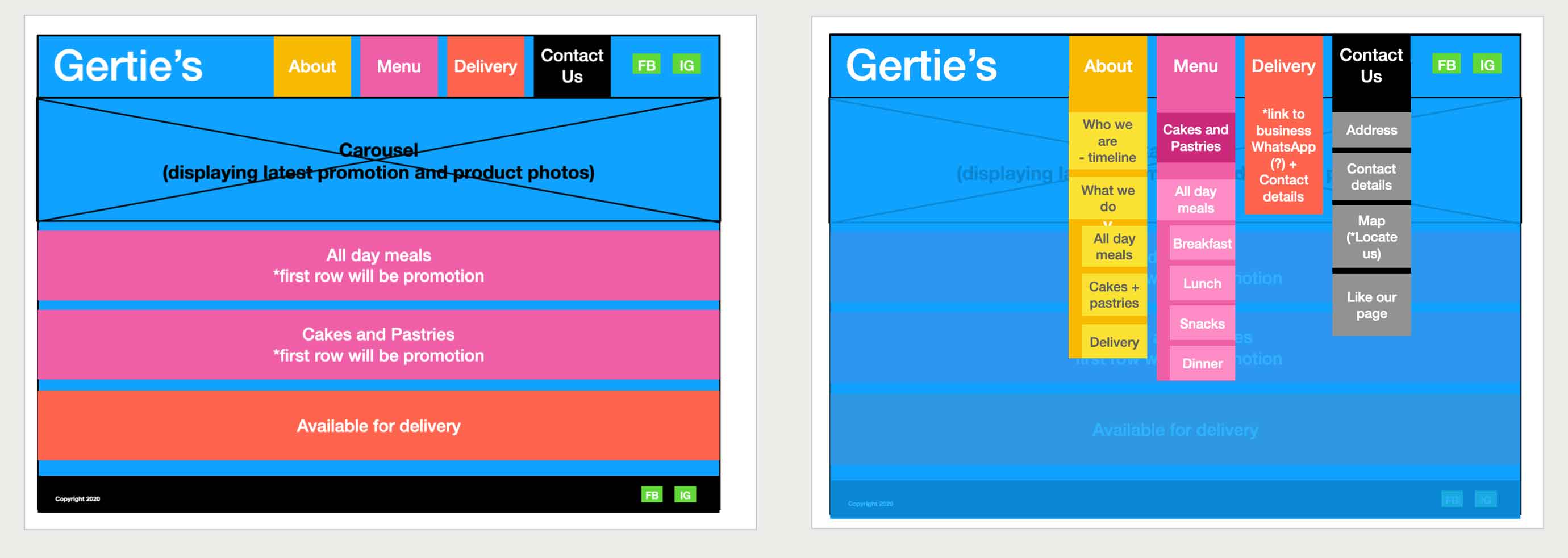
Drawing insights from gathered research, I systematically organized and prioritized content, streamlining the creation of site information and wireframes. This categorization process, influenced by frequently asked questions on Google and Facebook, resulted in the creation of three distinct pages: Main (About), Menu, and Contact.
About
Who we are
1990 – Started selling homemade bread in front of their garage. In October, they opened their first store in Cut Cut 1, Tarlac city.
1995 – Opened their 2nd store with bigger space.
2020 – Relocated to a new space selling all-day meals where customers can dine in or take away
What we do
Cakes & Pastries, All-day meals, Delivery service
Menu
- Bakeshop = Cakes & Pastries
- Fastfood = All day meals
- Delivery
UI
Based on their current logo, the colors are yellow, red, and lime green. I wanted to propose a whole new look for Gerties by focusing on the name, toning down the red, and limiting the colors to be just red and dark grey for simplicity and a clean look.
- For optimal readability, I’ve employed fonts like Open Sans, Helvetica, and a sans-serif font.
- The landing page is designed with three distinct sections: Cakes and Pastries, All-Day Menu, and Delivery. Utilizing a 12-column layout allows for efficient use of space, incorporating 2-4 column images and texts.
- A user-friendly form is integrated for inquiries and orders.
- Each section features a 3-column layout of thumbnail product images and information. To guide users toward the delivery and contact pages, an ‘Order Here’ text with a link to the contact page will be added.
- The website will include a carousel of images to showcase Gerties’ latest promotions.
- Social media account links will be incorporated, and an Instagram feed will be placed at the bottom of the website after the contact page to boost follower engagement.
- The design is responsive, ensuring easy accessibility across different devices.

Features
The website will feature the following:
- Main page will have responsive navigating buttons like Home, Menu, Delivery, and Contact pages
- About us – a paragraph form of their history and what they do.
- Carousel – showcase latet promotion
- Delivery – showing address, contact information and enquiry form.
- Menu page – Hero image with short description on top of page. After that, there will be 3-col thumbnail photos and product details.
- Cakes and Pastries
- All day menu – breakfast, lunch, snacks, & dinner.
- Delivery page – form will consist of name, contact, & a 3-row text area for enquiries and orders.
- Contact page – includes location map, address, contact details and social media icons.
- Carousel with Hero Images – will have a fade transition accompanied by a headline and subtext describing the photos.
- Order now buttons – when hovered it will change to black and when clicked, it will change to white.
Future implementation
- Shopping cart – for users to place orders.
- Payment gateway – to support shopping cart.
- Modal showing detailed information of each product when they click the product image or *Order now button.
- Pop-up chat – for urgent response and faster enquiry.
Features Left to Implement
- Enhance animation
- Product gallery
Technologies Used
List of tools I used for this website:
- Getbootstrap
- The project uses getbootstrap to make the site responsive.
- Fontawesome
- The project uses fontawesome to add icons for contact and footer pages.
- Powr.io
- The project uses powr.io to get more followers in shop’s instagram account.
- Bootstrap’sJavaScript
- The project uses Bootstrap’s Javascript to make animation work in carousel.
- [JQuery]
- Markdown
- The project uses MarkdownCheatsheet as quick reference for documenting readme file.
- [Keynote]
- The project uses Keynote as UX research tool for documenting stakeholder’s background, information architecture and low-fidelity mock up.
- AdobeXD
- The project uses AdobeXD as wireframing tool for creating medium-fidelity mock up and converting images for web.
- HTML5 For consistent rendering in every browser.
- LanguageAttribute For translation tools to determine what rules to use.
- CSS3
- MediaQuery Added breakpoints for parts of the different designs.
- Adobe Illustrator For tracing Gertie’s logo.
Testing
I shared the repository link with my family and Aunt Gertie to seek her approval for using the photo.
For feedback, I referenced getsitecontrol and posed the following questions after they interacted with the website:
- Did you find what you were looking for? (Yes or No)
- How did you discover the website? (Google, Facebook, Instagram, Referred by a friend)
- Is there anything I should improve?
The feedback indicated a desire for more visibility of the menu list. Consequently, I adjusted the menu page from thumbnails of each product to a column list, where each column represents breakfast, lunch & dinner, cakes & pastries, and snacks.
Additionally, I observed a misalignment issue when scrolling sideways due to an extra gap. I addressed this by debugging and creating a new index.html, ensuring proper alignment by setting specific width measurements, either at 100% or with specified dimensions.
Deployment
I utilized Visual Studio Code for local code development and leveraged Github for project deployment. The project structure includes distinct folders for images, plugins, and readme files.
While committing the readme file, I encountered a challenge due to saving a 117.4mb gif file. An error occurred after pushing the file. To resolve this, my mentor, Arif, recommended running the bfg code to clean up the repository by removing large files, and this solution proved effective.
 FG Portfolio
