

I built this project to enhance my skills in deploying single-page website by creating a bucket in Amazon’s S3.
- Open your React folder in VC code and run
npm run buildto compile important files and folders. - In AWS Console, open S3 service and create a unique bucket name.
- Under Objects tab
- Upload all files that were compiled in your build folder. (*Don’t include the build folder.)
- Select the
index.htmland underActionsdropdown, selectMake public using ACL
- Under
Permissionstab- Block public access (bucket settings): clear all boxes so that
Block all public accessis turn off. - In Bucket policy, click
editand create a policy statement usingPolicy generator - Settings under Policy Generator
- Block public access (bucket settings): clear all boxes so that
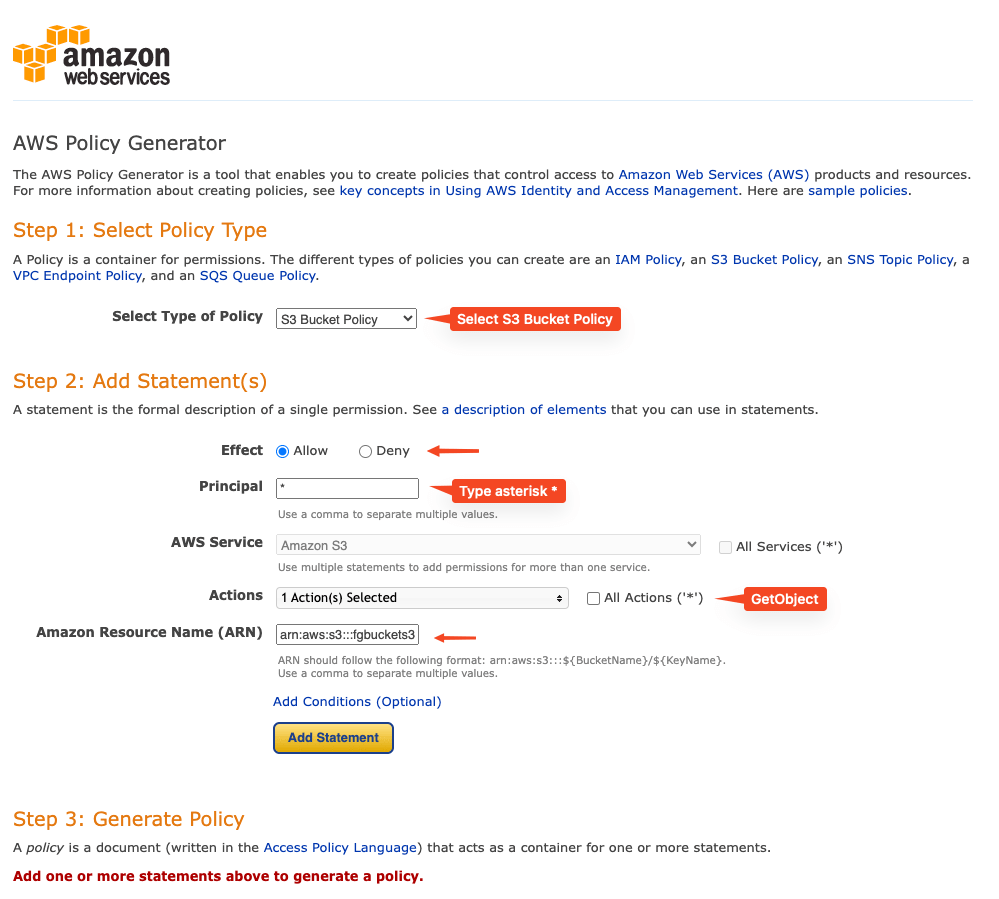
- Once policy is generated, locate
Resourceand add a/*at the end of the ARN endpoint - Save changes
- Under
Propertiestab- AWS Region:
select your region location - Bucket Versioning:
Enabled - Static website hosting -> S3 static website hosting:
Enabled - Bucket website endpoint:
http://<bucket name>.s3-website.ca-central-1.amazoneaws.com(Remember the URL endpoint)
- AWS Region:
Check the Bucket website endpoint under Properties tab, where it is successfully hosted
How to add a Custom Domain and TLS using Route 53
Creating a custom domain
- In AWS Console, open S3 service and locate the Bucket website endpoint created from existing project.
- Go to Route 53, register your preferred domain name and
Create record- Record type: CNAME – Routes traffic to another domain name and to some AWS…
- Record name: <type your preferred domain name>
- Value: paste the Bucket website endpoint
- Click
Create new record - Test the new domain name
Add a TSL certificate
TLS is important in every web domain to secure the website.
- In AWS Console, open CloudFront service
- Using AWS Certificate Manager (ACM), create a custom TSL certificate via Route 53 service. A new CNAME record will be added in Route 53 list.
- A new domain name with an endpoint of
********.cloudfront.netis created. Copy it and go back to Route 53 and locate the domain in the list. Update the DNS by changing the value to cloudfront endpoint. - It’ll take from 5 mins to 20 mins to deploy the TSL. Test the website using
httpsandhttpto ensure it is redirected to the secured website.
 FG Portfolio